Common Pitfalls in Digital Signing and How eSignSure Avoids Them
In today’s fast-paced digital landscape, the importance of secure and efficient signing processes cannot be overstated. With more businesses shifting to remote operations, digital signing has become essential, yet many still stumble over common pitfalls.
Introduction
In today’s fast-paced digital landscape, the importance of secure and efficient signing processes cannot be overstated. With more businesses shifting to remote operations, digital signing has become essential, yet many still stumble over common pitfalls.
Understanding these challenges can empower organizations to streamline their operations. Some frequent issues include:
- Security Concerns: Many users worry about the safety of their data, leading to hesitation in adopting e-signatures.
- Legal Validity: Misunderstandings about whether digital signatures hold the same weight as traditional ones can hinder usage.
- User Experience: A complicated signing process can frustrate both clients and employees.
To illustrate, a 2023 study by McKinsey revealed that companies with intuitive digital signing solutions reported a 40% increase in customer satisfaction.
In this article, we’ll explore these pitfalls in more detail and show how eSignSure effectively addresses each one, providing both security and simplicity in the digital signing experience.
Understanding Digital Signing
Digital signing is an essential process in today's business environment, streamlining the way contracts and documents are executed. It allows individuals to sign documents electronically, ensuring both authenticity and integrity.
Key concepts include:
- Authentication: Ensures that the signer is who they say they are, typically using methods like passwords or biometric data.
- Integrity: Guarantees that the document remains unchanged after signing. Any alterations can invalidate the signature.
- Non-repudiation: Prevents signers from denying their involvement in the signing process.
Example: A small business faced challenges with paper contracts that often got lost or delayed. By switching to digital signing, they improved their contract turnaround time by 70% and significantly reduced errors.
Pro Tip: Always choose a digital signing solution that complies with industry standards, such as the ESIGN Act and eIDAS, to ensure legal validity across jurisdictions.
Understanding these fundamentals helps businesses avoid common pitfalls, such as security issues and compliance risks, while maximizing the benefits of digital signing.
What is Digital Signing?
Digital signing is a method of signing documents electronically, providing a secure and efficient alternative to traditional pen-and-paper signatures. It uses cryptographic techniques to ensure the authenticity and integrity of the signed document.
Key features of digital signing include:
- Authentication: Only authorized individuals can sign, preventing unauthorized access.
- Integrity: The document remains unchanged after signing, assuring the recipient that it hasn't been tampered with.
- Non-repudiation: Signers cannot deny having signed; this is crucial for legal validity.
For example, a small business may use digital signing for client contracts, reducing turnaround time significantly. Instead of waiting days for physical signatures, they can close deals in minutes.
Pro Tip: Always choose a digital signing platform that complies with e-signature laws such as the ESIGN Act in the U.S. This ensures that your digital signatures hold legal weight. According to a 2023 study, businesses that adopted digital signing reported a 70% reduction in contract processing time.
Importance for Small Businesses
The adoption of digital signing solutions, like eSignSure, is crucial for small businesses looking to stay competitive.
Benefits include:
- Increased Efficiency: Digital signatures streamline the signing process, reducing the time spent on manual paperwork. For example, a local real estate agency reported cutting contract turnaround times by 70% after implementing eSignSure.
- Cost Savings: With reduced printing and postage costs, small businesses can significantly lower operational expenses. A small consulting firm found they saved over $1,000 annually by switching to electronic signatures.
- Enhanced Security: Digital signatures provide superior security, protecting sensitive information from unauthorized access. eSignSure uses encryption and authentication methods to ensure your documents remain confidential.
- Improved Accessibility: Clients can sign documents anytime and from anywhere, which is especially beneficial for businesses with remote or mobile clients.
Pro Tip: Regularly review your digital signing process to identify any potential pitfalls, such as compliance issues, and leverage eSignSure's support for best practices. Keeping your technology updated can also enhance security and user experience.
Common Pitfalls in Digital Signing
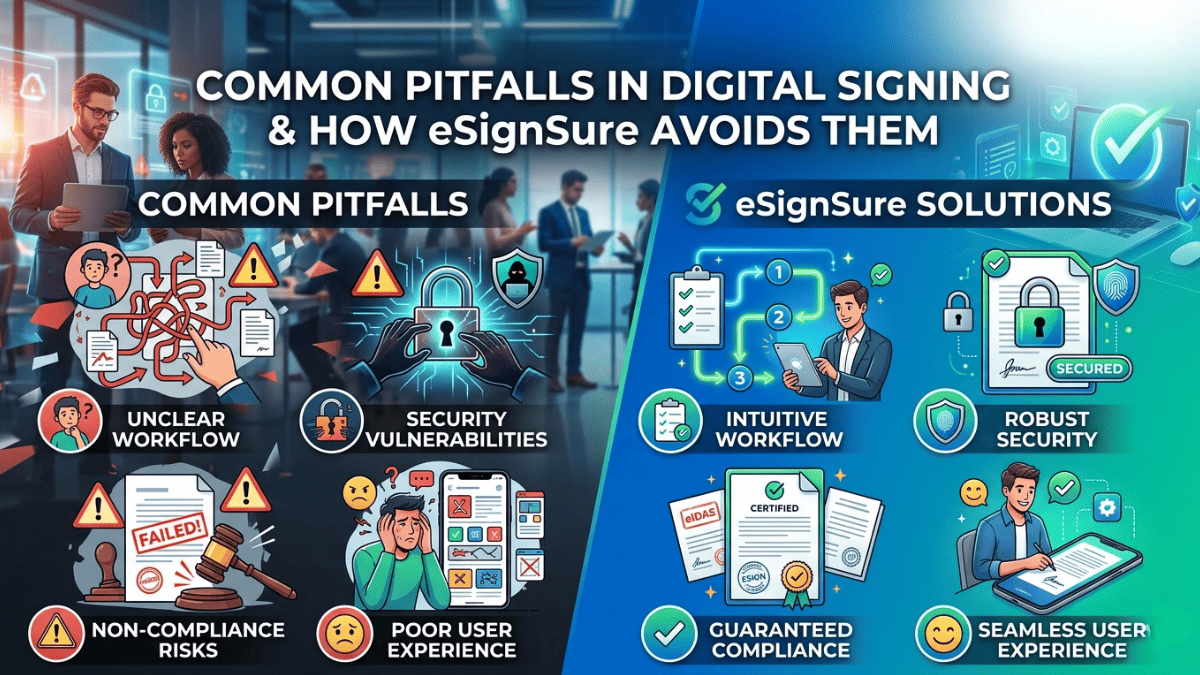
Digital signing comes with its own set of challenges, and being aware of these pitfalls can save time and resources.
- Lack of Understanding: Many users underestimate the legal implications of digital signatures. A proper understanding is crucial to ensure that the signed documents are enforceable. For example, a contract signed without the necessary authentication can be deemed invalid in court.
- Inadequate Security Measures: Using unsecured platforms can lead to data breaches. Always opt for solutions that offer encryption and multi-factor authentication. Pro tip: Regularly update passwords and review user access levels.
- Ignoring Compliance: Not all digital signing solutions comply with regulations like eIDAS or ESIGN Act. Failing to verify compliance can result in legal troubles. Choose providers like eSignSure that prioritize adherence to relevant laws.
- Poor User Experience: Complicated signing processes can frustrate users. Streamlining the experience can enhance efficiency. Pro tip: Utilize platforms that provide intuitive interfaces and mobile compatibility.
By addressing these issues proactively, organizations can leverage digital signing more effectively and securely.
Lack of User Authentication
Lack of user authentication can lead to significant vulnerabilities in digital signing processes. Without robust authentication, unauthorized individuals may gain access to sensitive documents, resulting in fraud and data breaches.
- Types of Authentication:
- Single-Factor Authentication (SFA): Often just a password, which can be easily compromised.
- Two-Factor Authentication (2FA): Adds a second layer, such as a text message code or authenticator app, enhancing security.
- Multi-Factor Authentication (MFA): Incorporates multiple verification methods, making it challenging for attackers.
For instance, a financial institution that implemented MFA saw a 75% decrease in unauthorized access attempts, according to a 2023 report by Cybersecurity Ventures.
Pro Tip: Always opt for platforms that offer advanced authentication methods. eSignSure, for example, employs biometric verification and encrypted credentials to ensure only authorized users can sign documents.
Incorporating strong authentication not only protects sensitive information but also builds trust with clients, fostering a secure digital signing environment.
Insecure Document Transmission
Insecure document transmission is a significant risk in digital signing. When documents are sent over unsecured channels, they can be intercepted, altered, or misused by unauthorized parties.
- Common transmission methods like unencrypted emails or unsecured cloud storage can expose sensitive information.
- A 2023 study found that over 60% of businesses experienced data breaches due to insecure document sharing practices.
For instance, a small business that shared contracts via regular email without encryption faced a data breach that cost them thousands in legal fees and reputation repair.
To mitigate these risks, consider the following:
- Use secure channels: Always send documents through encrypted platforms or secure file-sharing services.
- Implement access controls: Limit who can view or edit documents to authorized personnel only.
- Employ digital signatures: These not only authenticate the signer but often include encryption that secures the document during transmission.
Pro tip: Regularly update your security protocols and educate your team on the importance of secure document handling to maintain integrity and confidentiality.
Failure to Comply with Legal Standards
Failure to comply with legal standards can expose businesses to significant risks, including legal battles and diminished trust from clients. Digital signatures must meet specific regulations, such as the Electronic Signatures in Global and National Commerce (ESIGN) Act and the Uniform Electronic Transactions Act (UETA).
- Common legal pitfalls include:
- Not verifying the identity of signers, leading to unauthorized signatures.
- Failing to provide clear consent options, which may invalidate the agreement.
- Neglecting to store signed documents securely, risking data breaches.
Example: In 2023, a financial institution faced penalties because it did not authenticate signers adequately, resulting in fraudulent transactions.
Pro Tips:
- Use eSignSure’s identity verification features to confirm signer authenticity.
- Ensure that all parties understand and agree to the electronic signing process through clear consent language.
- Regularly review compliance with local and international regulations to stay updated on any changes.
By prioritizing legal standards, businesses can safeguard themselves against potential pitfalls and maintain the integrity of their digital transactions.
Digital Signing Mistakes Businesses Make
Many businesses stumble in the digital signing process, leading to inefficiencies and compliance issues. Common mistakes include:
- Neglecting Security Features: Failing to implement strong security measures can expose sensitive information. For instance, a company that uses basic password protection for e-signatures risks unauthorized access, potentially leading to fraud.
- Ignoring User Experience: A complicated signing process can frustrate clients. For example, a financial firm lost clients due to a clunky interface that made signing lengthy contracts cumbersome.
- Not Training Staff: Employees unfamiliar with digital signing tools may make errors. Consider a real estate agency that faced delays because agents didn’t know how to troubleshoot common signing issues.
- Overlooking Legal Compliance: Signing documents without understanding the legal framework can invalidate contracts. Ensure that your digital signing solution adheres to regulations like the ESIGN Act.
Pro Tip: Regularly update your digital signing platform to leverage new features and security enhancements. This not only protects your business but also improves user satisfaction.
Overlooking User Experience
Overlooking user experience in digital signing can lead to significant issues, such as low adoption rates and frustrated users. When the signing process is cumbersome or not intuitive, users may abandon transactions altogether.
Consider these common user experience pitfalls:
- Complex Navigation: If users struggle to find where to sign, they might give up. Simplified workflows are essential.
- Lack of Guidance: Users benefit from clear instructions. For instance, a quick tooltip explaining each step can reduce confusion.
- Inconsistent Design: A mismatched interface can leave users feeling lost. Consistency across devices and platforms fosters familiarity.
eSignSure prioritizes user experience by implementing features such as:
- User-friendly dashboards: Clear layouts that guide users seamlessly through the signing process.
- Interactive tutorials: Step-by-step guides that help users understand each function.
- Responsive design: A consistent experience across desktops, tablets, and mobile devices.
Pro Tip: Regularly solicit feedback from users to identify pain points in the signing process and make iterative improvements.
Ignoring Integration Capabilities
Ignoring integration capabilities can severely hinder the efficiency of your digital signing process. If your e-signature solution doesn’t seamlessly integrate with existing tools, it may lead to fragmented workflows and wasted time.
- Increased manual work: Without integration, users often resort to manual data entry, which is prone to errors and delays.
- Poor user experience: A lack of connectivity can frustrate users, leading to lower adoption rates and incomplete transactions.
For example, a mid-sized law firm implemented a standalone e-signature tool that didn't integrate with their case management software. As a result, they spent significant time transferring data manually, which delayed document turnaround.
Pro Tip: Look for e-signature solutions that offer robust API support and pre-built integrations with popular platforms like Salesforce, Google Workspace, or Microsoft 365. This ensures a smoother, more efficient workflow.
Ensure that the tool you choose aligns with your existing technologies to maximize productivity and minimize disruptions.
Conclusion
Navigating the landscape of digital signing can be challenging, but avoiding common pitfalls is crucial for ensuring security and compliance. eSignSure stands out by addressing these issues head-on.
Key Takeaways:
- User Experience Matters: Simplified interfaces can prevent user errors. eSignSure offers intuitive design that enhances user satisfaction.
- Compliance is Crucial: Many platforms overlook legal aspects. eSignSure integrates compliance features to ensure your documents meet regulatory standards.
- Security is Non-Negotiable: With increasing cyber threats, robust encryption and authentication methods are essential. eSignSure prioritizes security to safeguard your information.
Pro Tip: Regularly review your digital signing processes and stay updated with the latest compliance requirements to protect your business.
Consider switching to eSignSure to enhance your digital signing experience, mitigate risks, and streamline your workflows. By choosing a reliable e-signature solution, you can focus more on your business and less on potential pitfalls.
1: What are the common problems businesses face with digital signing?
Common problems include security risks, lack of user authentication, legal compliance issues, and complicated signing processes.
2: How can businesses make digital signing more secure?
Businesses can use encryption, multi-factor authentication, secure document sharing, and access controls.
3: Why is user authentication important in digital signing?
User authentication verifies the identity of the signer and helps prevent unauthorised access and fraudulent signatures.
4: How does eSignSure help businesses avoid digital signing problems?
eSignSure helps simplify signing processes through security features, authentication, user-friendly dashboards, and document management.
5: Can digital signing platforms integrate with existing business software?
Yes. Platforms with API support can integrate with CRM systems, cloud platforms, and other business applications.
About the author

Santosh Shet
Santosh Shet is the Founder of Appyminds and a technology entrepreneur with over 20 years of experience in software development, web applications, mobile apps, AI solutions, and business automation. He helps businesses transform ideas into scalable digital products through modern web development, mobile applications, intelligent automation, and AI-powered solutions. Santosh regularly writes about artificial intelligence, software development, digital transformation, SaaS products, and emerging technology trends.